Previous   2940-2960 of 3792    Next

3792 language-arts results | sort by:

Share    return to subject listing
Less
More

Gods and Mythology of the Vikings - History.com and Column Five

Grades
6 to 12
0 Favorites 0  Comments
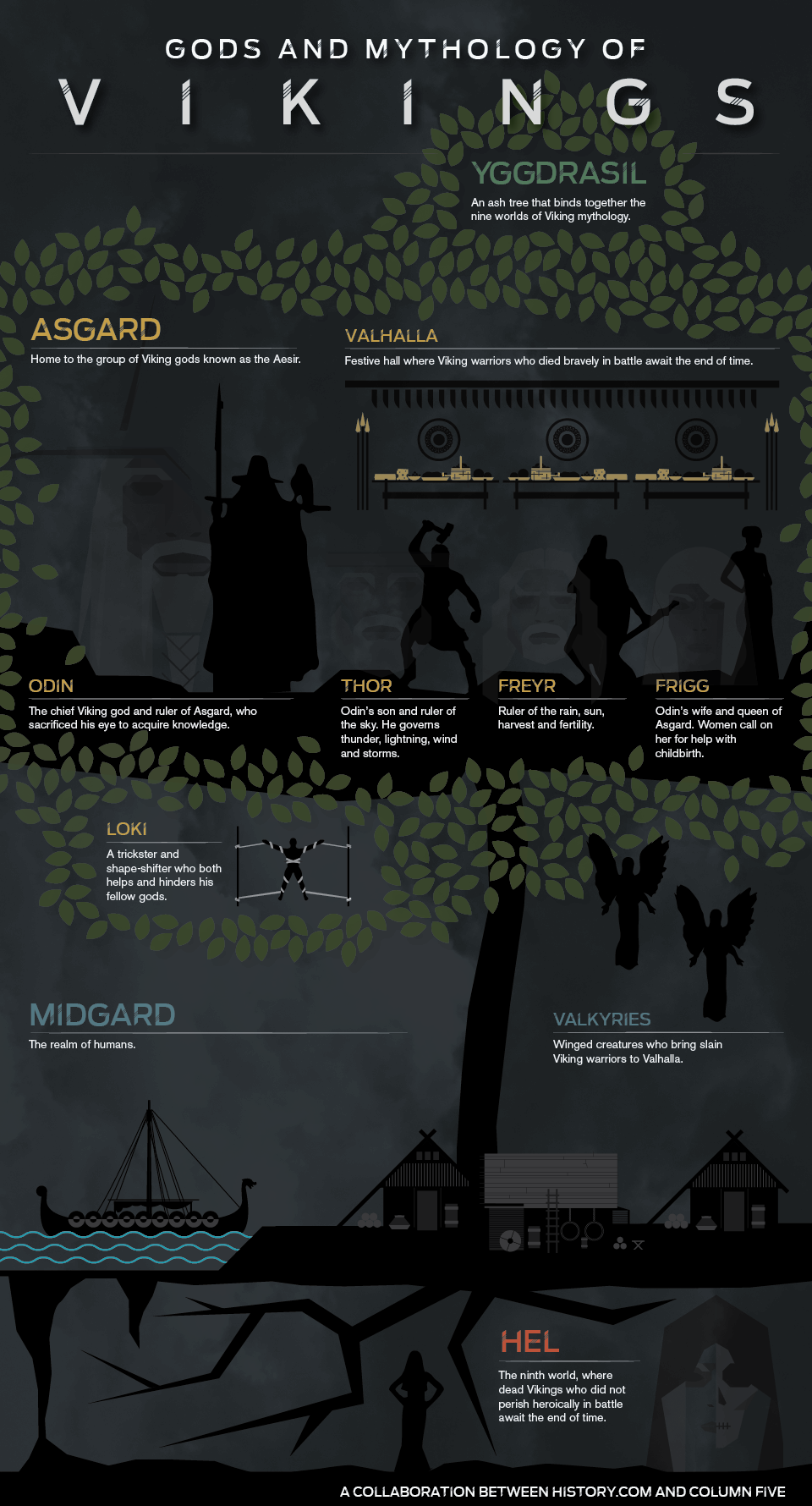
This impressive infographic shows information about Viking or Nordic Mythology. Find short explanations for Yggdrasil, Asgard, Vallaha, Odin, Thor, Freyr, Frigg, Loki, Midgard, Valkyries,...more
Here is the direct link to share this resource review. Feel free to copy and paste this URL into an email or place it on your web page or blog so others can read this TeachersFirst review:

 Close Link

This impressive infographic shows information about Viking or Nordic Mythology. Find short explanations for Yggdrasil, Asgard, Vallaha, Odin, Thor, Freyr, Frigg, Loki, Midgard, Valkyries, and Hel. Click on the infographic to make it smaller or larger.

In the Classroom

Use this infographic in conjunction with a study of Viking Mythology. Divide the students into small groups to investigate the different terms mentioned on the infographic. Have the students present their findings to the class by creating a multimedia presentation using one of the many TeachersFirst Edge tools, reviewed here. You might consider having students use Nordic Gods, reviewed here, to gather some basic information about the gods, Asgaard, etc.

Add your comments below (available only to members) | Become a Member

Rating (click star to set rating):

Close comment form

You must be registered and logged in to add items to your favorites.
Use the form at the top of the page to log in, or click here to join TeachersFirst (it's free!).

Close

Less
More

Useful charts - UsefulCharts Publishing

Grades
5 to 12
1 Favorites 0  Comments
Find hundreds of useful charts and diagrams that illustrate philosophy, english, history, science, current events, and more for free, online viewing. You will find PDFs, posters, timelines,...more
Here is the direct link to share this resource review. Feel free to copy and paste this URL into an email or place it on your web page or blog so others can read this TeachersFirst review:

 Close Link

Find hundreds of useful charts and diagrams that illustrate philosophy, english, history, science, current events, and more for free, online viewing. You will find PDFs, posters, timelines, etc. Learn about topics such as: Most Famous Paintings, World Leaders Timeline, Muppet Voices Chart, New Seven Wonders, Human Evolution Timeline, and more. General "subjects" include Social Studies Charts, Most Popular Charts, Psychology Charts, Philosophy & Religion Charts, English Charts, Science Charts, and many others! The site is selling charts and downloads, but you can view the site for FREE. Zoom in to see details using the View menu in your web browser or touchpad zooming on Macs.
This site includes advertising.

In the Classroom

Share a visual overview of a topic on projector or IWB before teaching or as a reference before lessons that zero in on subtopics. Use this site to teach data and the graphic display of data. Allow groups of students to choose a graphic and report to the class on how the data was made more meaningful using the graphics that were chosen. You may also want to share this link as a research tool for debates or presentations on science or social studies topics. Share the timeline or graphic on your projector or interactive whiteboard. Discuss the science, history, or math behind the data collected. Discuss other information and ways of presenting the information in order to create a more interesting graphic. Have students try their hand at creating an infographic using a tool such as Snappa, reviewed here.

Add your comments below (available only to members) | Become a Member

Rating (click star to set rating):

Close comment form

You must be registered and logged in to add items to your favorites.
Use the form at the top of the page to log in, or click here to join TeachersFirst (it's free!).

Close

Less
More

dotEPUB - Xavier Badosa

Grades
3 to 12
3 Favorites 0  Comments
 
Convert the content of any webpage into an e-book format to read on your tablet, phone, or other e-reader device using dotEPUB-- even offline! Install the browser bookmarklet in Firefox,...more
Here is the direct link to share this resource review. Feel free to copy and paste this URL into an email or place it on your web page or blog so others can read this TeachersFirst review:

 Close Link

Convert the content of any webpage into an e-book format to read on your tablet, phone, or other e-reader device using dotEPUB-- even offline! Install the browser bookmarklet in Firefox, Safari, Opera, Mozilla, or Chrome to begin. In Chrome and Mozilla use the dotEPUB browser extension to create documents. Once installed, click on the bookmarklet or browser extension while on any page to convert the page and send to your e-reader. Choose from either epub or mobi (Kindle) format for use in e-readers. View the instructional videos for complete directions on how to use the bookmarklet or extension. This site is also available in Spanish. The instructional videos are hosted on YouTube. If your district blocks YouTube and you wish to share the videos in class, they may not be viewable.

In the Classroom

What a great find for BYOD programs! Use dotEPUB for students to take content from your course blog or website and put it on their e-readers for easy access wherever they go. Have students download informational texts from web sites to annotate in their e-reader software as you build comprehension and "close reading" skills a la CCSS. Elementary teachers will need to help students learn to use this tool. Use dotEPUB to create an ePub portfolio of your students' blogging efforts. In Spanish class, convert your website into an e-book for students to practice language learning. Make ePubs of any web content for portability and annotation tools available on e-readers.

Add your comments below (available only to members) | Become a Member

Rating (click star to set rating):

Close comment form

You must be registered and logged in to add items to your favorites.
Use the form at the top of the page to log in, or click here to join TeachersFirst (it's free!).

Close

Less
More

My American Farm - American Farm Bureau Foundation

Grades
K to 6
6 Favorites 0  Comments
    
Learn and explore everything about agriculture, food processing, sustainable farming, and equipment engineering interactively at this informate and entertaining site! The activities...more
Here is the direct link to share this resource review. Feel free to copy and paste this URL into an email or place it on your web page or blog so others can read this TeachersFirst review:

 Close Link

Learn and explore everything about agriculture, food processing, sustainable farming, and equipment engineering interactively at this informate and entertaining site! The activities feature different concepts and promote various aspects of agriculture, math, science and society. Hover over the game icon with your mouse to view a short description of the activity, approximate playing time, grade range, curriculum area, and agriculture theme. At the end of each interactive, you can watch short, related video stories from the public television show "America's Heartland." Don't miss the Equipment Engineering challenge. The Educator Resources section contains standards, implementation ideas, and many activity sheets for classroom use. View resources by curriculum area or agriculture topic using the links on the left in this section.

In the Classroom

This site is great during units on plants, farms, conservation, or even inventions and engineering. Create links to games on classroom computers. As students complete games, let them fill out the passport included on the site. Print and use classroom activities included on the site as a supplement to current lessons. Have students create their own comics to explain a topic from the site using comic-creation tools from this collection.
 This resource requires PDF reader software like Adobe Acrobat.

Add your comments below (available only to members) | Become a Member

Rating (click star to set rating):

Close comment form

You must be registered and logged in to add items to your favorites.
Use the form at the top of the page to log in, or click here to join TeachersFirst (it's free!).

Close

Less
More

Yippy - Yippy, Inc.

Grades
2 to 8
0 Favorites 0  Comments
Use Yippy to pull search results from other search engines and avoid being "tracked" by your own searches. Yippy groups topics together and breaks it up by clusters or "clouds." ...more
Here is the direct link to share this resource review. Feel free to copy and paste this URL into an email or place it on your web page or blog so others can read this TeachersFirst review:

 Close Link

Use Yippy to pull search results from other search engines and avoid being "tracked" by your own searches. Yippy groups topics together and breaks it up by clusters or "clouds." Yippy self-filters against many topics that students shouldn't be exposed to, such as gambling, pornography, political propaganda, or other inappropriate sites. As always, keep a close eye on students working independently and talk about what to do when something inappropriate comes up. While Yippy is safer than a general search engine, students still need to learn about safe and ethical behavior online, since nothing is foolproof. Enter your search term. View the definition at the top. Different clusters appear along the left navigation side to help refine your search and help beginning searchers learn how to add more specific terms.
This site includes advertising.

In the Classroom

Use for any topic in any subject area. For example, a search for evolution revealed the following clusters: Texas Board, Biology, Human, and Theory. View more options by clicking on all clouds at the bottom of the list. Discuss with your class what kind of information about the topic that you are looking for before choosing a cloud. Have a broad concept to discuss in class? Assign a specific cloud to each group of students and have them report their findings back to the class. Have a class discussion about how all of the pieces of information fit together. Create a class concept map that ties all the information together. Use a tool such as bubbl.us (reviewed here) to create and share the concept maps.

Add your comments below (available only to members) | Become a Member

Rating (click star to set rating):

Close comment form

You must be registered and logged in to add items to your favorites.
Use the form at the top of the page to log in, or click here to join TeachersFirst (it's free!).

Close

Less
More

Pocket - Read It Later, Inc

Grades
K to 12
3 Favorites 0  Comments
  
Pocket is a bookmarking and curation application that syncs across all of your devices to save online articles or videos for later viewing. Saving is simple. Download the bookmarklet...more
Here is the direct link to share this resource review. Feel free to copy and paste this URL into an email or place it on your web page or blog so others can read this TeachersFirst review:

 Close Link

Pocket is a bookmarking and curation application that syncs across all of your devices to save online articles or videos for later viewing. Saving is simple. Download the bookmarklet on your computer or the Pocket app to your mobile device. When you see something to save for later viewing, click the share button to send to your Pocket account. View at anytime (even offline). Sort by content type such as article, video, or text. Add tags to organize content as you wish. Pocket integrates with many other online tools, such as Twitter and Flipboard. Share articles using social networking or email links to the Pocket app. Although this site is recommended for all grade levels, younger students would only be able to use this site if the collection was completed by an adult. Click to view the short introduction video to learn more.

In the Classroom

Use Pocket professionally to collect and share websites, videos, and images for lessons and units. Use Pocket to share sites with colleagues, parents, and students. Share this site with older students to use to save resources they find for research. Demonstrate how to use Pocket and share with students as a resource for collaborating on group projects. Be sure to talk about using tags to organize things so they don't end up with a giant "pocketful" of tangled "stuff."

Add your comments below (available only to members) | Become a Member

Rating (click star to set rating):

Close comment form

You must be registered and logged in to add items to your favorites.
Use the form at the top of the page to log in, or click here to join TeachersFirst (it's free!).

Close

Less
More

OK2Ask: TeachersFirst Exclusives that Spark Curiosity in the Classroom - TeachersFirst

Grades
K to 12
1 Favorites 0  Comments
 
This recording of an OK2Ask online professional learning session is from August 2020. You can register and immediately view the archive of the session.

Explore four free

...more
Here is the direct link to share this resource review. Feel free to copy and paste this URL into an email or place it on your web page or blog so others can read this TeachersFirst review:

 Close Link

This recording of an OK2Ask online professional learning session is from August 2020. You can register and immediately view the archive of the session.

Explore four free TeachersFirst exclusive resources that spark curiosity and support classroom instruction. Let TeachersFirst help you save time and assist you with creating engaging learning experiences for your students. Enhance reading comprehension across content areas with our library of pre-made virtual field trips that immerse students in literature and build context and interest in the characters and their journeys. Support geography and mapping skills in grades 2-6 with the weekly episodic adventures of Geo and Meri. Build cross-cultural understanding and practice digital writing weekly with XW1W. Explore a web-based, interactive infographic of the Battle of Gettysburg designed to raise questions and invite connections for students in grades 5-10. As a result of this session, teachers will: 1. Understand the importance of context within instruction; 2. Explore four curricular support resources that can be used to spark curiosity and discussion in the classroom; and 3. Plan for the use of a TeachersFirst exclusive, web-based resource in your lessons. This session is appropriate for teachers at all technology levels.

In the Classroom

The archive of this teacher-friendly, hands-on webinar will empower and inspire you to use learning technology in the classroom and for professional productivity. As appropriate, specific classroom examples and ideas have been shared. View the session with a few of your teaching colleagues to find and share new ideas. Find additional information and links to tools at the session resource page. Learn more about OK2Ask and upcoming sessions here.

Add your comments below (available only to members) | Become a Member

Rating (click star to set rating):

Close comment form

You must be registered and logged in to add items to your favorites.
Use the form at the top of the page to log in, or click here to join TeachersFirst (it's free!).

Close

Less
More

OK2Ask: 3 Cool Tools for Images - TeachersFirst

Grades
2 to 12
2 Favorites 0  Comments
 
This recording of an OK2Ask online professional learning session is from May 2022. You can register and immediately view the archive of the session.

When using projects
...more
Here is the direct link to share this resource review. Feel free to copy and paste this URL into an email or place it on your web page or blog so others can read this TeachersFirst review:

 Close Link

This recording of an OK2Ask online professional learning session is from May 2022. You can register and immediately view the archive of the session.

When using projects for alternative assessment and feedback, you'll find that students can express themselves more creatively when given tools to share what they have learned. Come to this session to learn about three tools students can use to work with images for their projects. We'll discuss digital citizenship expectations and explore tools that allow students to responsibly repurpose digital resources. You might even find a tool that is useful for your own purposes when creating learning objects! As a result of this session, teachers will: 1. Understand the tenets of copyright and digital citizenship that apply to remixing and reusing images. 2. Explore three tools and how each can be used to alter and change images; and 3. Plan for the introduction of creative image tools in the classroom. This session is appropriate for teachers at all technology levels.

In the Classroom

The archive of this teacher-friendly, hands-on webinar will empower and inspire you to use learning technology in the classroom and for professional productivity. As appropriate, specific classroom examples and ideas have been shared. View the session with a few of your teaching colleagues to find and share new ideas. Find additional information and links to tools at the session resource page. Learn more about OK2Ask and upcoming sessions here.

Add your comments below (available only to members) | Become a Member

Rating (click star to set rating):

Close comment form

You must be registered and logged in to add items to your favorites.
Use the form at the top of the page to log in, or click here to join TeachersFirst (it's free!).

Close

Less
More

Resources related to Source Reliability/Checking Sources - TeachersFirst

Grades
K to 12
0 Favorites 0  Comments
As educators, we must teach our students how to make sure the resources they are using are reliable. This collection includes information and resources related to checking sources and...more
Here is the direct link to share this resource review. Feel free to copy and paste this URL into an email or place it on your web page or blog so others can read this TeachersFirst review:

 Close Link

As educators, we must teach our students how to make sure the resources they are using are reliable. This collection includes information and resources related to checking sources and determining if a source is reliable and credible.

In the Classroom

We have included resources for all grades. Remember, our "In the Classroom" suggestions with each reviewed resource, give you ideas about using these tools in your classroom.

Add your comments below (available only to members) | Become a Member

Rating (click star to set rating):

Close comment form

You must be registered and logged in to add items to your favorites.
Use the form at the top of the page to log in, or click here to join TeachersFirst (it's free!).

Close

Less
More

OK2Ask: Tech Integration Made Easy with Canva - TeachersFirst

Grades
K to 12
1 Favorites 0  Comments
 
This recording of an OK2Ask online professional learning session is from July 2022. You can register and immediately view the archive of the session.

Provide challenging
...more
Here is the direct link to share this resource review. Feel free to copy and paste this URL into an email or place it on your web page or blog so others can read this TeachersFirst review:

 Close Link

This recording of an OK2Ask online professional learning session is from July 2022. You can register and immediately view the archive of the session.

Provide challenging learning opportunities for your students while promoting innovative classroom instruction by using digital image creation to engage students and deepen their content area knowledge. Students can create posters, social posts, videos, presentations, and more that demonstrate their knowledge construction skills. Learn to use Canva for classroom projects and personal productivity, and brainstorm with others about ways you and your students can use this tool to demonstrate learning. As a result of this session, teachers will: 1. Learn basic use of Canva; 2. Explore three different ways to use Canva in the classroom; and 3. Plan for the use of Canva in your instructional setting. This session is appropriate for teachers at all technology levels.

In the Classroom

The archive of this teacher-friendly, hands-on webinar will empower and inspire you to use learning technology in the classroom and for professional productivity. As appropriate, specific classroom examples and ideas have been shared. View the session with a few of your teaching colleagues to find and share new ideas. Find additional information and links to tools at the session resource page. Learn more about OK2Ask and upcoming sessions here.

Add your comments below (available only to members) | Become a Member

Rating (click star to set rating):

Close comment form

You must be registered and logged in to add items to your favorites.
Use the form at the top of the page to log in, or click here to join TeachersFirst (it's free!).

Close

Less
More

Grades 3-5 Research Resources for Teaching Remotely on Short Notice - TeachersFirst

Grades
3 to 5
1 Favorites 0  Comments
Take your remote teaching activities to the next level with these research resources for grades 3-5. Each suggestion includes information about the online resource and how to get started....more
Here is the direct link to share this resource review. Feel free to copy and paste this URL into an email or place it on your web page or blog so others can read this TeachersFirst review:

 Close Link

Take your remote teaching activities to the next level with these research resources for grades 3-5. Each suggestion includes information about the online resource and how to get started. Additional resources include links to TeachersFirst blogs and other primary source links with ideas for classroom use.

In the Classroom

Incorporate videos, articles, and quizzes found in the National Geographic link as part of an overall learning experience using Curipod, reviewed here. As students complete their research projects provide a variety of options for sharing their learning. Ideas to include as options include Adobe Creative Cloud Express for Education, reviewed here, Clipchamp reviewed here, and Spotify for Podcasters, reviewed here.

Add your comments below (available only to members) | Become a Member

Rating (click star to set rating):

Close comment form

You must be registered and logged in to add items to your favorites.
Use the form at the top of the page to log in, or click here to join TeachersFirst (it's free!).

Close

Less
More

Jonathan Allen Homepage

Grades
1 to 5
0 Favorites 0  Comments
If you're a Jonathan Allen fan, this is the homepage of the British author/illustrator. His works include board books, picture books, verse, fiction and even pop-ups! Two of his best...more
Here is the direct link to share this resource review. Feel free to copy and paste this URL into an email or place it on your web page or blog so others can read this TeachersFirst review:

 Close Link

If you're a Jonathan Allen fan, this is the homepage of the British author/illustrator. His works include board books, picture books, verse, fiction and even pop-ups! Two of his best known picture books are, "Two by Two by Two" and "Sweetie."

In the Classroom

Share this site with your students if you read these books together.

Add your comments below (available only to members) | Become a Member

Rating (click star to set rating):

Close comment form

You must be registered and logged in to add items to your favorites.
Use the form at the top of the page to log in, or click here to join TeachersFirst (it's free!).

Close

Less
More

FanFiction - FanFiction/FictionPress

Grades
6 to 12
0 Favorites 0  Comments
 
Disappointed that your favorite book or TV series has ended? Satisfy your craving on FanFiction. Discover FanFiction stories written by up-and-coming writers based on your favorite...more
Here is the direct link to share this resource review. Feel free to copy and paste this URL into an email or place it on your web page or blog so others can read this TeachersFirst review:

 Close Link

Disappointed that your favorite book or TV series has ended? Satisfy your craving on FanFiction. Discover FanFiction stories written by up-and-coming writers based on your favorite comic, cartoon, movie, book, television show, or other genre. Read and vote for your favorites or even write your own. Whether you are a fan of fiction or like to dabble with writing, take a look at FanFiction. Fanfiction authors write new stories about characters from their favorite books (movies, TV series, etc.). Read to your heart's content and leave a comment without even signing in. To create and submit your own writing you need to sign up with an email. Click on the genre of your choice to get started! This site can be accessed in a variety of languages. Click the small "mobile forum" icon at the top to use on mobile iOs or Android devices.
This site includes advertising.

In the Classroom

It is amazing how students will polish their writing for an authentic audience! Demonstrate how to use FanFiction with your projector or interactive whiteboard. Show students the different genres and have them read a selection or two from an amateur writer to see how it works. Have student pairs or trios work together on a piece for a favorite book. There is also a miscellaneous category you could use to have students add a different ending or write from a different point of view based on any short story you use in class. They can also submit in the poetry category. Use 121 Writing reviewed here to proof student writing and make suggestions (verbally if your choose to) before they submit to FanFiction. For students to develop and polish their writing skills, use a program such as Slick Write reviewed here. Create a FanFiction account with a class email and have students work on their piece using a nickname or acronym. Since FanFiction can be accessed in several languages, this program would work well in an ESL/ELL classroom.

Add your comments below (available only to members) | Become a Member

Rating (click star to set rating):

Close comment form

You must be registered and logged in to add items to your favorites.
Use the form at the top of the page to log in, or click here to join TeachersFirst (it's free!).

Close

Less
More

Mind Over Media - Media Education Lab

Grades
6 to 12
1 Favorites 0  Comments
 
Learn to recognize the power of communication and understand today's "new" forms of propaganda through critical analysis and discussion using tools found on Mind Over Media. Browse...more
Here is the direct link to share this resource review. Feel free to copy and paste this URL into an email or place it on your web page or blog so others can read this TeachersFirst review:

 Close Link

Learn to recognize the power of communication and understand today's "new" forms of propaganda through critical analysis and discussion using tools found on Mind Over Media. Browse through the site to learn the four techniques used to influence others along with specific examples. Be sure to check out the section for teachers that includes a complete six-lesson curriculum aligned to Common Core and other National Standards. Share a link to this site for parents to use as a resource for discussing ways people try to influence teens at home. The videos reside on YouTube. If your district blocks YouTube, the videos may not be viewable.

In the Classroom

Discover the many ready-to-go free lesson ideas to include with classroom discussions of propaganda and persuasive advertising techniques. Share the Learn section with students as part of a flipped lesson, then have students provide examples of propaganda they find on TV or the Internet. Ask students to find advertising demonstrating two opposing points of view, then, with younger or less technically experienced students, use an online tool such as Interactive Two Circle Venn Diagram, reviewed here to compare and contrast information found. With older or more technically experienced students, use a tool such as Whimsical Mind Maps, reviewed here to create charts or a mind map to make the comparison.

Add your comments below (available only to members) | Become a Member

Rating (click star to set rating):

Close comment form

You must be registered and logged in to add items to your favorites.
Use the form at the top of the page to log in, or click here to join TeachersFirst (it's free!).

Close

Less
More

Word Game Time - Copyright '''''''© 2011 Fila, LLC

Grades
K to 7
3 Favorites 0  Comments
  
Join Word GameTime for language arts, geography, math, and typing activities. Find a variety of games including brain games, crosswords, vocabulary, world capitals, and spelling. Worksheets...more
Here is the direct link to share this resource review. Feel free to copy and paste this URL into an email or place it on your web page or blog so others can read this TeachersFirst review:

 Close Link

Join Word GameTime for language arts, geography, math, and typing activities. Find a variety of games including brain games, crosswords, vocabulary, world capitals, and spelling. Worksheets and educational videos offer further explorations.
This site includes advertising.

In the Classroom

In your classroom, offer Word GameTime as a center. Have students keep a log of the games they successfully complete to earn classroom incentives. Find appropriate interactives by grade level or by subject area. Include this link on your class web page as a place for reinforcement or even enrichment.
 This resource requires PDF reader software like Adobe Acrobat.

Add your comments below (available only to members) | Become a Member

Rating (click star to set rating):

Close comment form

You must be registered and logged in to add items to your favorites.
Use the form at the top of the page to log in, or click here to join TeachersFirst (it's free!).

Close

Less
More

What So Proudly We Hail: Making American Citizens Through Literature - Amy and Leon Kass

Grades
5 to 12
3 Favorites 0  Comments
  
Be inspired to love American History! Development citizenship and awareness by using this ten-part curriculum of short stories, speeches, and songs. The curriculum consists of three...more
Here is the direct link to share this resource review. Feel free to copy and paste this URL into an email or place it on your web page or blog so others can read this TeachersFirst review:

 Close Link

Be inspired to love American History! Development citizenship and awareness by using this ten-part curriculum of short stories, speeches, and songs. The curriculum consists of three categories. The Meaning of America explores the American character and identity through the "close reading" of classical short stories such as "To Build a Fire" and "Man Without a Country." The American Calendar examines the purpose of the American holiday, proposing the celebrations help to unite us and attach us to our country. Songs for Free Men and Women scrutinizes national songs for meaning and how they emotionally attach us to our nation. All of this curriculum is inquiry based. It also offers suggested discussion questions, study guides, author biographies, and video discussions to model how higher-level-thinking conversations about each text should sound. What So Proudly We Hail uses primary texts, has rigor, is inquiry based, and has many essay topics and writing prompts aligned to the Common Core Standards for English Language Arts and Literacy in History/Social Studies. A few of the blog entries include helpful information about the Common Core standards.
This site includes advertising.

In the Classroom

This comprehensive program can be a bit overwhelming at first look. You might want to pick just one, high interest short story lesson, perhaps Jack London's "To Build a Fire." This lesson and many others lends itself to small group discussion and work. The introduction makes observations and asks questions to encourage active reading and deep discussions that you may want to use as a class. Whether you and your students complete the lesson as a class or in small groups, you may want to use a program like Today's Meet reviewed here to enable all students to have a voice. If using small groups, have students post what the group decided are the answers on Today's Meet so everyone can see all answers. Where answers differ, have students go back into the reading and cite evidence to support their answer on Today's Meet for all to see. Teachers of gifted and music can choose selected ideas from this site, as well. A teaching team could make this site the focus of a year-long effort with so much material available. Upper elementary teachers and higher can make holidays and patriotic songs far more meaningful through close reading and class discussions

Add your comments below (available only to members) | Become a Member

Rating (click star to set rating):

Close comment form

You must be registered and logged in to add items to your favorites.
Use the form at the top of the page to log in, or click here to join TeachersFirst (it's free!).

Close

Less
More

'45 Words' Video Lesson - NewseumED

Grades
8 to 12
1 Favorites 0  Comments
    
Brought to you by NewseumED, this video is a perfect fit to introduce any unit on the First Amendment and its freedoms. Find a comprehensive lesson plan, watch the video ...more
Here is the direct link to share this resource review. Feel free to copy and paste this URL into an email or place it on your web page or blog so others can read this TeachersFirst review:

 Close Link

Brought to you by NewseumED, this video is a perfect fit to introduce any unit on the First Amendment and its freedoms. Find a comprehensive lesson plan, watch the video through the NewseumEd site, and download documents in either PDF or Word formats. The documents include a list of historical figures and their involvement with the issues from the period, and a viewing guide worksheet for students to fill in. All of the actors' words, in the video, are direct quotations taken from primary sources. Since the video focuses on the origins of the freedom of the press, it would make a fascinating intro to a media literacy unit, too.

In the Classroom

Whether studying the First Amendment or media literacy, upload this video to a tool such as EDPuzzle, reviewed here, to edit the video to show only portions you select, or to pause the video automatically and add questions for students to answer, and/or add your verbal comments. Some of the Discuss questions would be appropriate to insert after viewing parts of the video. Break students into small groups after the video and assign them different Discuss questions for reflection and investigation. Challenge small groups to create a presentation to share what they learned using a tool like slides, reviewed here. After watching and discussing the video, extend either a media literacy unit or a civics/government unit. Do this by asking students to view news articles in our present political situation i.e. election time, civil rights discussed, etc. Then have them compare how the news media during the late 1700s would have handled issues of today, and how politicians of the Federalist party would have reacted to our issues today. Alternatively, have students create a simple infographic comparing the problems in the news of then and now. Use a tool such as Infogram, reviewed here.
 This resource requires PDF reader software like Adobe Acrobat.

Add your comments below (available only to members) | Become a Member

Rating (click star to set rating):

Close comment form

You must be registered and logged in to add items to your favorites.
Use the form at the top of the page to log in, or click here to join TeachersFirst (it's free!).

Close

Less
More

Bouncy Balls - Neave Interactive

Grades
K to 4
0 Favorites 0  Comments
Captivate and challenge students while maintaining quiet times in your classroom with Bouncy Balls! Turn on the microphone to capture sound; the quieter your environment is, the more...more
Here is the direct link to share this resource review. Feel free to copy and paste this URL into an email or place it on your web page or blog so others can read this TeachersFirst review:

 Close Link

Captivate and challenge students while maintaining quiet times in your classroom with Bouncy Balls! Turn on the microphone to capture sound; the quieter your environment is, the more settled the balls remain. If there is more noise, the balls start flying and jumping around the screen. In addition to bouncy balls, choose from bubbles, eyeballs, and smiley face icons. There is also a full screen option. Our editors had some trouble trying to figure out HOW to enable the microphones. Here are some tips that we learned. If you are using Firefox or Chrome, you must allow pop-ups. You should get a message in the narrow band below the address bar asking you to "Allow Microphone" for this site. At the time of this review, this site was not working properly on the Safari browser. Even so, this is still one site you will want to explore and "have a ball." Unfortunately, this site does not work on mobile devices.
This site includes advertising.

In the Classroom

Use Bouncy Balls during silent reading time, on reentering the classroom after lunch, recess or special classes or anytime you are trying to maintain quiet. Graph the length of time balls lay still; then challenge your class to improve their time each day or reach a set goal. Use with preK students during nap/quiet time as a visual reminder for quiet. Use this during silent reading time in class.

Add your comments below (available only to members) | Become a Member

Rating (click star to set rating):

Close comment form

You must be registered and logged in to add items to your favorites.
Use the form at the top of the page to log in, or click here to join TeachersFirst (it's free!).

Close

Less
More

openverse - Creative Commons

Grades
5 to 12
2 Favorites 0  Comments
openverse is a search tool to find free images that are available under public domain and Creative Commons licenses. At the time of this review, in Beta, is an Audio ...more
Here is the direct link to share this resource review. Feel free to copy and paste this URL into an email or place it on your web page or blog so others can read this TeachersFirst review:

 Close Link

openverse is a search tool to find free images that are available under public domain and Creative Commons licenses. At the time of this review, in Beta, is an Audio search. Type your search term in the search bar to begin browsing. Narrow your options by using the available filters, including image type, file type, source, image ratio, and image size. Each image includes HTML attribution information to copy and paste onto your web page.

In the Classroom

Use this image search in a variety of ways for classroom use. Ask students to find images of cells, animals, geographic formations, etc. to use with class projects and presentations. Be sure to remind students to use the attribution link along with the photo, especially when publishing on the web. Keep this site as a reference link on your class web page for any time students are creating wikis, blogs, or electronic projects where they need images. They can find just the right picture with CC licensing, and you should require them to include the citation provided! Be sure that students understand the rules for sharing appropriate and inappropriate images and copyright concerns.

Add your comments below (available only to members) | Become a Member

Rating (click star to set rating):

Close comment form

You must be registered and logged in to add items to your favorites.
Use the form at the top of the page to log in, or click here to join TeachersFirst (it's free!).

Close

Less
More

Word Sense - codeLily LLC

Grades
6 to 12
0 Favorites 0  Comments
Word Sense is a dictionary and thesaurus presented in a unique, interactive display. Enter your word in the search box and view the definition. Click on any of the related ...more
Here is the direct link to share this resource review. Feel free to copy and paste this URL into an email or place it on your web page or blog so others can read this TeachersFirst review:

 Close Link

Word Sense is a dictionary and thesaurus presented in a unique, interactive display. Enter your word in the search box and view the definition. Click on any of the related terms to view definitions and connections from the associated words. Use links to go directly to the definition of any associated word or term to continue exploring and understanding terms. There is a link to "Learn How it Works" to learn more about the possibilities at this site. We strongly recommend that you explore how it works first! Note: This is a full service dictionary, so ANY word is available for search, including those not appropriate at school. Use caution with less mature students searching independently. Be certain to set clear expectations and consequences for inappropriate searches.

In the Classroom

Have students create a word cloud of the important terms they learn from this site. Explore word meanings, connotations, and antonyms. Use a word cloud maker to create clouds of new words learned - WordItOut, reviewed here. Use Word Sense to understand and explore vocabulary words of the day or week. Share with students as a resource for preparing for standardized testing, such as the SAT/ACT.

Add your comments below (available only to members) | Become a Member

Rating (click star to set rating):

Close comment form

You must be registered and logged in to add items to your favorites.
Use the form at the top of the page to log in, or click here to join TeachersFirst (it's free!).

Close

Previous   2940-2960 of 3792    Next